Developer Tools Are Products, Not JSON Viewers
How GitMyABI combines in-app documentation, progress-aware onboarding, real-time build feedback, generated bindings, and team-scoped billing into one developer journey.
- Published
- April 30, 2026
- Updated
- Updated July 16, 2026
- Author
- Daniel Mark
- Reading time
- 12 min read
GitMyABI is a smart contract developer platform from AxLabs GmbH. It turns GitHub repositories into versioned ABIs on a CDN and TypeScript bindings published through npm. The backend performs that work. The frontend still has to answer the questions a developer actually asks: What does this product do? How do I configure my first project? Is my build still running? Which package should I install? What happens when I reach a plan limit?
The value comes from treating documentation, onboarding, real-time feedback, domain-specific outputs, and billing as one journey. These are not finishing touches added after the API ships. They are the product developers interact with.
A working API is not yet a product
The minimum viable developer interface is easy to recognize. Authenticate, fetch a list, render its fields, and perhaps expose a debug view of the response body. Developers tolerate that in internal tools and one-off scripts.
A B2B developer tool that teams return to needs more than a working API:
- Documentation that lives inside the product, not only on a marketing site
- Onboarding that respects what the user has already completed
- Live feedback when compilation and code generation outlive a single request
- Monetization surfaces that keep pricing, entitlements, and upgrade paths aligned
GitMyABI's domain makes these surfaces operational rather than decorative. Users care about build status, npm package names, team ownership, and ABI delivery. Rendering JSON.stringify in a side panel can show what the server returned. It cannot explain what to do next or whether a long-running job is still moving.
Designing the developer journey
The frontend connects the major stages of a developer's journey.
A developer can begin with the in-app documentation at /docs, including sections for MCP and CLI integrations. After installing the GitHub App, they move through project creation and setup. When a free team selects functionality that requires a paid plan, Stripe checkout becomes part of that activation flow rather than an unrelated detour.
Successful setup leads to the project overview, where a latest-build snapshot summarizes the most recent job. The builds page then becomes the operational center: trigger a rebuild, filter history, and watch status change. Socket.IO events push immediate progress into the React Query cache while HTTP retains authority over the complete build record.
When code generation finishes, the project-level type-bindings page presents the result as something a developer can use. Builds appear in a timeline with commit context, package information, and npm install commands. If the team reaches a limit, upgrade actions preserve the active team and return the developer to the page they were already using.
Each surface answers the next question in the workflow. That continuity is what separates a product from a collection of API panels.
Documentation inside the product
GitMyABI treats public documentation as application architecture.
A typed registry defines each documentation entry through its title, description, canonical path, optional search keywords, and readiness status. That status distinguishes complete pages from intentionally limited draft content, which allows documentation to develop incrementally without pretending every section has equal coverage.
One registry feeds several surfaces. The documentation hub searches the same structure on the client. The sidebar determines the active section from the current path. Related links pull entries from the same section. The sitemap emits canonical documentation paths from the registry.
Page-level metadata still belongs to individual routes, but navigation and discovery derive from one model. This reduces the distance between what the product links to and what search engines can find.
The same concern now extends beyond human readers. GitMyABI serves an llms.txt file containing a concise map of published documentation, following an emerging convention for tools and AI agents that need to discover product information.
The registry and llms.txt are maintained separately, so drift remains possible. A new page can appear in the navigation before it reaches the agent-oriented index. Even with that limitation, the registry establishes the right architectural boundary: documentation changes behave more like schema updates than like dropping another Markdown file into a folder.
Onboarding based on progress
First-project onboarding uses a custom product tour rather than a generic sequence of tooltips.
A welcome dialog appears during the first authenticated experience unless the browser already records that the tour was completed or dismissed. Completion, dismissal, and the last visited step are stored under namespaced local storage keys. A restart action in settings clears the saved completion state and allows the tour to run again.
Persistence solves only one part of the problem. The more important distinction is how the tour progresses.
Steps can require an actual click or a non-empty input before enabling the next action. The tour therefore responds to product state instead of assuming that seeing a tooltip means the user completed the task. A skip action remains available, preventing experienced users from becoming trapped in a guided flow they do not need.
The tour connects instructions to real controls through data-tour attributes and route hints. This lets it highlight the repository selector, project form, and creation actions in context. It also creates coupling. Moving a button or changing a route can invalidate a tour step without producing a TypeScript error.
That tradeoff is acceptable when it is explicit. The tour gains precision by binding itself to the product interface, but it must be maintained alongside the screens it explains.
Project setup also intersects with billing. Certain repository choices or additional projects can require a plan upgrade. Form state is preserved across the Stripe redirect so setup can resume where the developer left off. Activation is therefore not limited to showing someone around. It also has to carry product state across entitlement checks and external payment flows.
Reconciling real-time events with server state
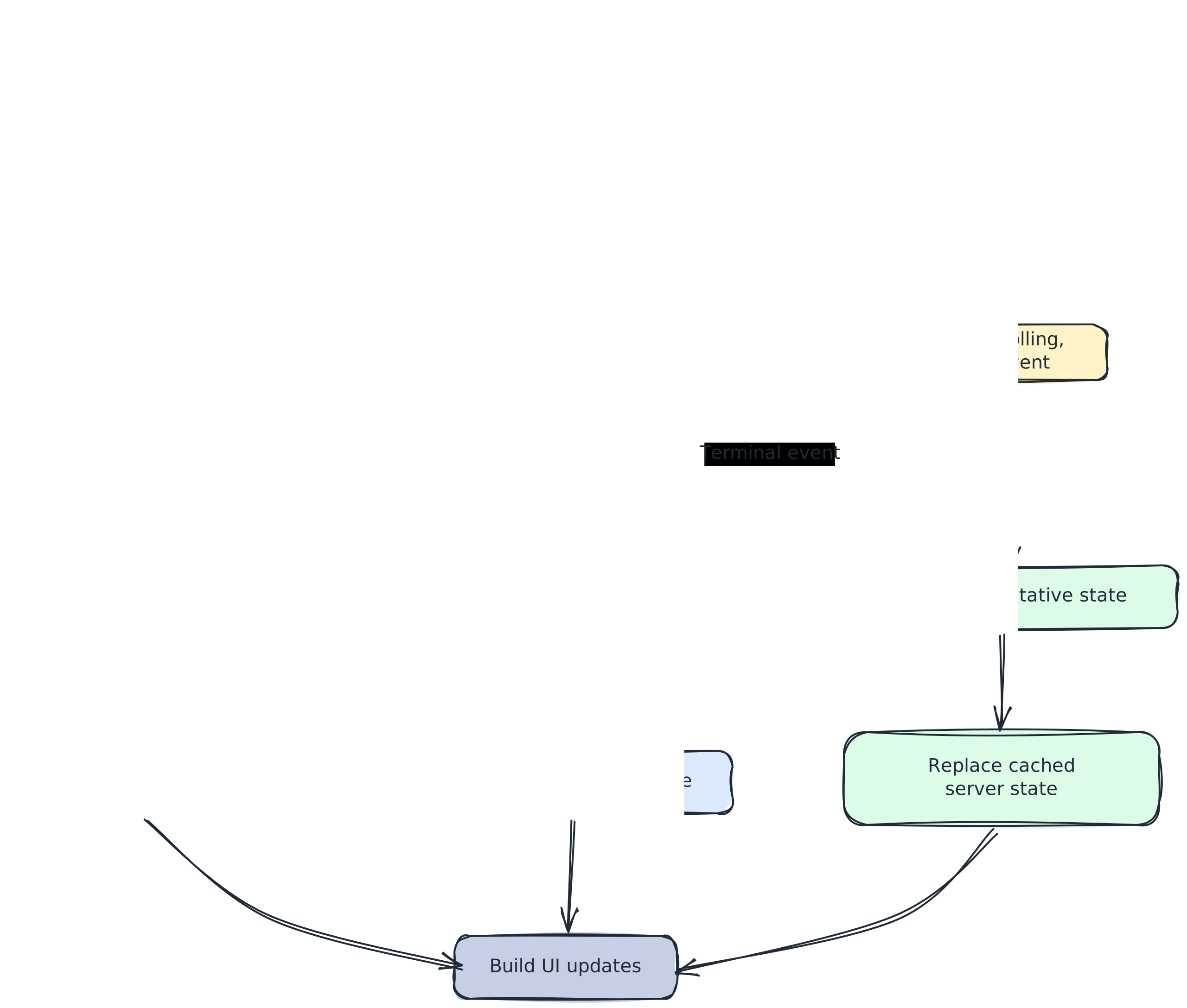
Build status is where product engineering meets distributed systems on the client. Compilation and code generation run long enough that a request-response model alone feels unresponsive. GitMyABI combines HTTP, Socket.IO, and React Query because each layer owns a different part of the experience.
Starting from HTTP
The builds list initially loads through a standard project query. It uses a modest stale window, periodic refetching, and reconnect refetching. Team-wide build history stays on the simpler HTTP refresh model without opening project-specific socket subscriptions.
Triggering a rebuild runs a mutation against the rebuild endpoint. On success, the mutation optimistically adds the new build to the cached list and invalidates the query so the next request can reconcile that optimistic state with the server.
The interface responds immediately, but it does not pretend that the client owns the final record.
Subscribing to project events
Project-scoped views connect to an authenticated Socket.IO channel and subscribe to events for the active project. The server publishes lifecycle events for build starts, failures, ABI readiness, and code generation.
Connection churn matters. A socket may disconnect, reconnect, or be replaced while React components are still mounted. Event handlers guard against stale socket instances so an abandoned connection cannot continue changing the current cache.
This is the unglamorous part of real-time interfaces. Opening a socket is easy. Deciding which connection is still allowed to affect the screen is the actual engineering work.
Patching versus refetching
The most important decision is which events should patch local state and which should return to HTTP.
When a build starts, the socket may announce running before the REST API stops returning pending. Refetching immediately could temporarily move the interface backwards. The builds page instead patches the matching React Query entry and records a client-side start time for elapsed-time display.
Terminal build and code-generation events take the opposite approach. They trigger a refetch so the client receives the complete server record, including final status, ABI counts, generated-package state, and timestamps.
The division is deliberate:
- Socket events provide immediacy.
- Cache patches prevent visible race conditions.
- HTTP provides complete, authoritative state.
- Periodic refetching gives missed events a path back to consistency.
Why this is a reconciliation problem
A real-time interface cannot assume that every event arrives once, in order, over a permanent connection.
Reconnections must restore subscriptions. Events can be missed while a client is offline. A build may change between the socket notification and the next HTTP response. Optimistic state can become stale. Every screen showing build information must follow the same rules for convergence.
That makes this a reconciliation problem, not merely a WebSocket feature. The transport moves information quickly. The cache policy determines whether the product remains correct.
Turning generated bindings into a product surface
Type bindings are an artifact developers install, not metadata they want to inspect.
The project-level type-bindings view presents generated packages as a timeline of builds. Each entry carries the context needed to make sense of the result: branch, commit information, relative time, package specification, and an npm install command.
This is a small but important product decision. A raw response might contain the same package name and version. The product surface connects that output to the build that created it and presents the next useful action.
Domain language matters here. Developers are not looking for an “artifact object.” They are looking for the package produced from a particular commit and the command needed to install it.
Keeping billing inside the team context
Monetization in a team-owned B2B product is a routing and state problem.
Public pricing reads tier information from centralized configuration and sends prospective users into the dashboard. Inside the application, billing belongs to team-scoped settings, where the current team, subscription, and normalized plan tier are already available.
A feature-limit layer translates tiers into product rules: how many projects a team can create, how much build history remains visible, which repository types are available, and how automated builds behave.
Those rules then become interface states. When a free team reaches the build-history limit, older rows appear behind a paywall overlay. The upgrade action opens Stripe checkout with the active team identifier and the current page as its return URL. The user can upgrade without losing the context that made the upgrade necessary.
The same principle applies during team creation and project setup. Pending form state is stored before leaving for checkout, allowing the application to restore the correct step after payment.
Marketing copy, frontend entitlement checks, and backend enforcement must describe the same product. Generic upgrade components are dangerous when they ignore team scope or return context. In a multi-tenant application, even a billing link needs to know whose account it is changing.
The coupling that product features introduce
Product-quality surfaces improve clarity and continuity. They also introduce coupling that a thin API client never encounters.
Documentation registries reduce navigation drift, but separately maintained discovery files can still fall behind. Tours tied to real DOM targets stay precise until a layout change moves the expected control. Socket-driven caches need reconciliation rules that every new build surface follows. Billing actions must preserve team and return-page context across external redirects. Team-scoped and project-scoped routes need clear ownership so links and providers carry the correct context.
These costs are not arguments against product engineering. They are reasons to make the underlying rules explicit.
A JSON viewer avoids many of these problems because it does almost nothing. Once the frontend begins guiding users, coordinating long-running work, and enforcing commercial boundaries, architecture becomes part of the product experience.
Platform primitives versus product behavior
The GitMyABI frontend shares patterns with Atlas, the frontend platform I developed and AxLabs adopted across its projects. Those patterns include typed environment validation, centralized data fetching with Zod parsing, React Query defaults, feature-flag governance, error boundaries, and reusable UI primitives.
These foundations answer recurring platform questions: How should data load? How are responses validated? How do failures appear? How are experiments governed?
GitMyABI-specific behavior sits on top. ABI and build schemas, project socket subscriptions, documentation content, first-project onboarding, Stripe integration, npm binding timelines, and tier-aware paywalls all belong to the product domain.
Atlas standardizes safe fetching and predictable application behavior. GitMyABI determines what a smart contract developer needs to see after a push to main.
That separation matters when deciding what should travel between projects. Primitives travel. Product journeys do not.
What I would improve next
The architecture points toward several evolutionary improvements.
First, I would centralize build synchronization in a shared provider. Project summaries, build lists, and future build surfaces should inherit one socket policy and one reconciliation contract instead of reproducing event callbacks independently.
Second, I would make onboarding progression depend more heavily on product state and less on DOM selectors. Attribute-based targets are useful for positioning guidance, but route-aware state transitions survive visual refactors more reliably.
Third, I would generate agent-facing documentation indexes from the same registry that drives navigation and the sitemap. That would keep llms.txt aligned with the human-facing documentation by construction.
Finally, I would consolidate entitlement definitions across pricing copy, product limits, and upgrade messaging. When several surfaces describe the same plan, they should derive that language from one model.
Each improvement responds to coupling introduced by an existing product surface. That is the natural next layer of discipline once the complete journey matters as much as the underlying API.
Closing
A developer tool becomes a product when documentation, onboarding, real-time feedback, domain-specific outputs, and billing form one continuous experience.
GitMyABI's frontend is built around that idea: a registry-backed documentation hub, progress-aware onboarding, a hybrid Socket.IO and React Query build list, a project-level bindings timeline, and team-scoped Stripe flows.
The API can work without any of it. A product developers return to cannot.
That is the bar worth holding for the next B2B developer tool interface: not whether the JSON renders, but whether the entire journey feels intentional.